Windows software for filament management
The slicer stores numbers.
FilamentPilot saves experience.
You keep printing the way you always have — your slicer, your profiles. FilamentPilot sits on top as a collection: every setting you've ever figured out lives permanently with the material it belongs to. From there, you write it into every slicer you use.
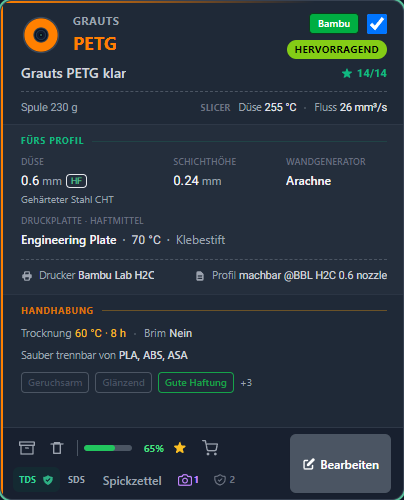
Everything you learn, you save in FilamentPilot.
Always there. For you and for everyone who works with you.
One question first
Where do you save what you try out and learn? In your head? On a sticky note? Manage your filament inventory, instead of guessing.
A year later, you no longer remember what belonged to which material.
What you do every day, you don't forget. What's gone is what you only need every few months.
What worked back then?
The first spool of PETG wouldn't stick. Second attempt: a different plate, glue stick, higher temperature — and it worked. Six months later, that same spool is back in the printer. Which plate was it? With glue or without? You're starting from scratch again.
And it affects everyone
For many, the fun starts right after PLA: the first spool of PETG, the first TPU, the first ASA. From there on, taking notes pays off — long before anyone calls you a professional. Because whatever isn't written down, you try out all over again: every failed print costs material, machine time and an evening — in a hobby workshop just as much as in production.
Getting started is free.
Pricing and featuresWhat you get out of it
Less time at the computer. Fewer prints in the bin.
You skip the searching
Looking it up takes seconds. Figuring it out again costs an evening — test print, measure, adjust, print again.
You save material
The most expensive failed print is the one you'd already avoided once before. The setting that worked back then is right there again.
Your knowledge stays
What you've figured out survives a new computer, a slicer update, and the colleague who leaves the workshop.
Do you make filament? Your material can reach the customer with your own values already in it.
For manufacturersThe last few percent
The manufacturer's profile gives you the starting point. Experience gives you the solution.
- 1
You start with a manufacturer profile.From the filament maker, from your slicer or downloaded. Adjusted to your printer and your nozzle.
- 2
You dial in the filament.Calibrate, read up, try again.
- 3
You build up experience.From the datasheet, from videos, forums and AI, from your own tests. Which plate, which adhesive, how long to dry.
PLA · PETG
ABS · ASA · PA
PC · PP
A rule of thumb from the workshop. PLA and PETG usually work right away. The more technical the material, the more every failed print costs.
A lot gets written down. Just not in one place.
Notes, bookmarks, phone, memory.Next time you gather it all up again.
You invest this time once.
FilamentPilot is your checklist. Every experience value has its fixed place. Fill it in, and your print becomes repeatable.
How you work with it
The values nobody else keeps track of. All in one place.
FilamentPilot collects fourteen experience values for every filament.
from the slicer Temperature and flow come straight from your profile.
Your experience Everything else, you figured out yourself.
You see the most important part right away — without opening the card. And your slicer doesn't even know most of it.
from the slicer
Brand, material, slicer name
GRAUTS · PETG · "Grauts PETG klar" — exactly as it appears in Bambu Studio, right down to the filament colour.
Your experience
Rating and completeness
Excellent — and ★ 14/14: all fourteen experience values are filled in.
from the slicer
Nozzle 255 °C · Flow 26 mm³/s
Your slicer knows these values — FilamentPilot reads them in, you don't type them out. Which program they came from is shown as an abbreviation in the top-right corner of the card.
Your experience
Empty spool weight
230 g. Without this value, the remaining amount on the scale is never right. With it, FilamentPilot works out what's left as soon as you weigh the spool.
Your experience
The high-flow nozzle
0.6 mm, hardened-steel CHT. This material was printed with it, and it worked.
Your experience
Which of the five build plates?
Engineering Plate ★, 70 °C, glue stick, no brim. Four plates on file, each with its own temperature and adhesive — the star marks the proven one.
Your experience
Printer and print profile
Bambu Lab H2C, profile "machbar @BBL H2C 0.6 nozzle". Which machine it ran on is right there.
1 2 3 4 5 6 7 8 9 10 11 12 13 14 Your experience
Layer height 0.24 mm
Which height suits this material. In the slicer it lives in the print profile, where it applies to every filament.
Your experience
Arachne wall generator · Ironing 40 mm/s
This depends on the material too. In the slicer, both live in the print profile — that is, with the printer.
Your experience
Drying
60 °C, 8 hours — and annealing isn't needed here.
Your experience
Cleanly separates from PLA, ABS, ASA
The decisive fact for multi-material printing: which support material actually releases?
Your experience
Your own tags
Low-odour, glossy, good adhesion. Your own terms, not ours.
Your experience
Stock and reordering
65% left on the spool — no more guessing how much material you've used, and the shop link hangs right on the material, one click from the shopping cart.
Your experience
Datasheet, photo, cheat sheet
TDS and SDS on file, a photo attached, the printout is one click away.
You'll find the same two colours on every field inside the app.
What you need while printing is right there in the overview.
On top of that: datasheets, certificates, key figures, bonding compatibility, notes and links. All attached to the filament it belongs to.
And if you want to take it with you
One page that shows it all.
At the press of a button, the card becomes an A4 page: temperatures, brim, drying, metric bars and a QR code for reordering. Print it for the workshop, send it as a PDF to a customer or colleague — even straight from your phone at the printer.
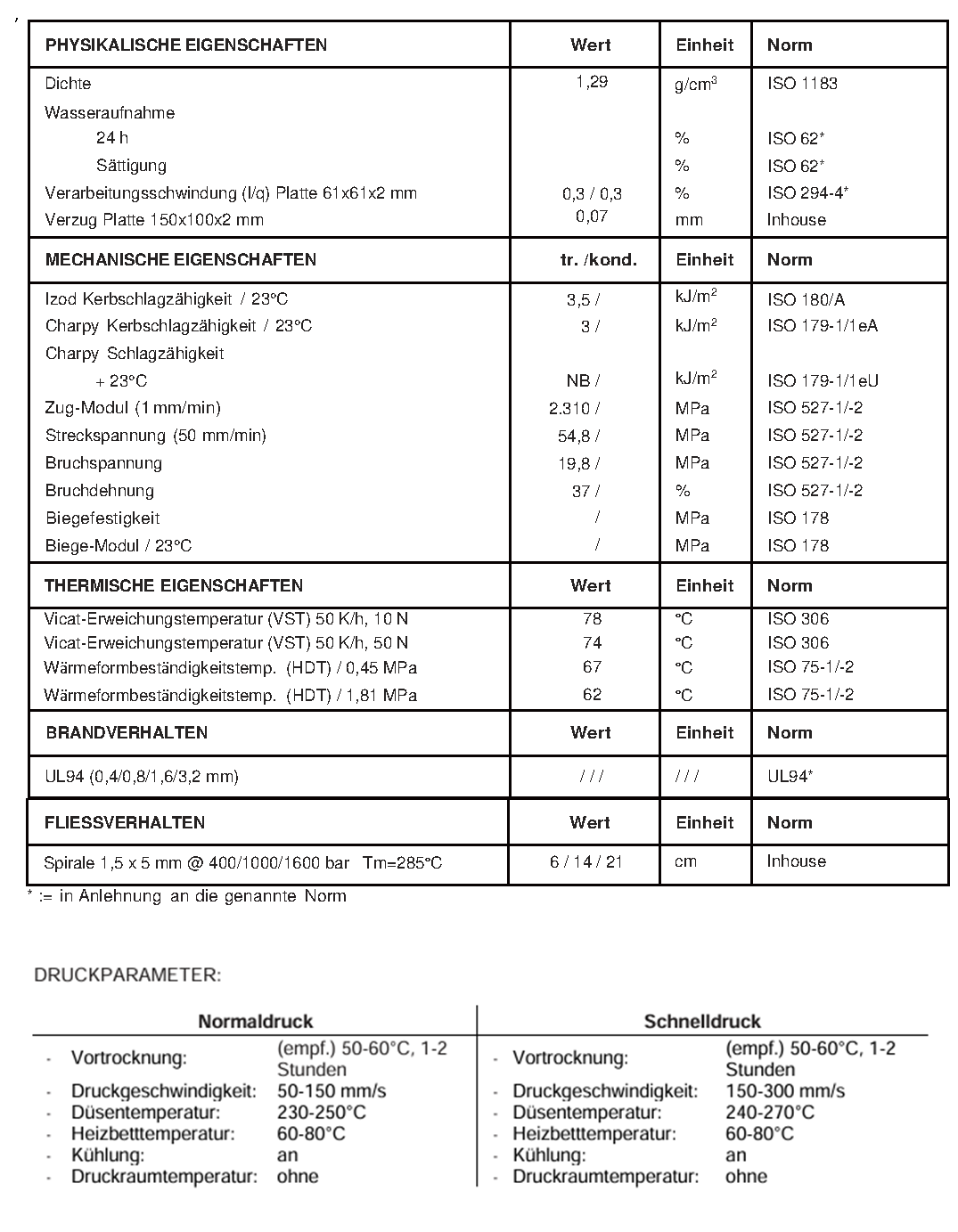
- ✗ Value ranges instead of final numbers
- ✗ Multiple pages, not print-ready
- ✗ No information on build plate or adhesive
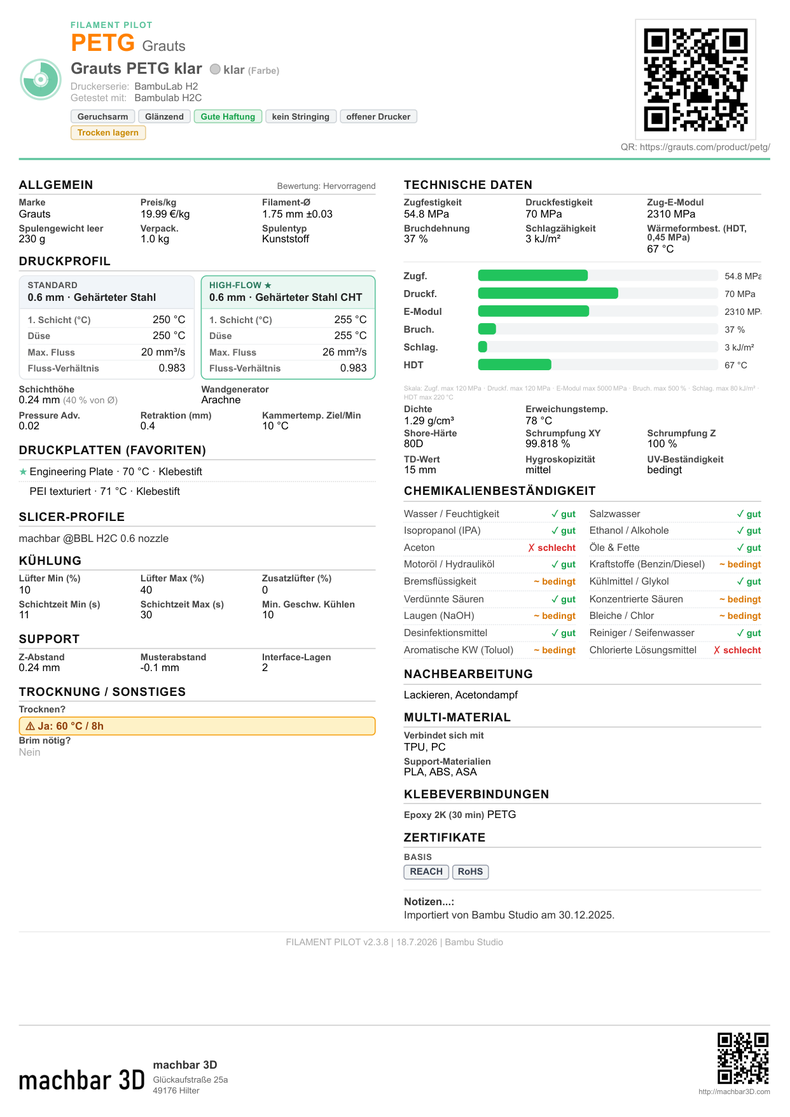
- ✓ One page, concrete values
- ✓ Brim, drying, supports and post-processing included
- ✓ QR code for reordering
Manufacturer datasheets are made for materials scientists. Your cheat sheet is made for you.
The heart of it
One profile. Every slicer. Sync slicer profiles — for every major slicer.
One filament profile — yours, a manufacturer's, or another user's. You write it into every supported slicer, on every computer. Your proven PETG profile from Bambu Studio lands in OrcaSlicer or PrusaSlicer with one click. FilamentPilot translates the values into the other program's format. Maintain it once. Use it everywhere.
Writing into every slicer and sharing it as a file: included in every version — even the free one.
Everything in one place. The first print works.
A profile becomes a card — and the card knows more.
Where your values come from
Your filament profile
read from your slicer
The manufacturer's filament profile
their tested values for the material
By hand
what you figured out yourself
FilamentPilot
Your filament card
Temperatures · flow · cooling
And what no slicer stores
- + Build plate and adhesive
- + Drying and annealing
- + Cleanly separates from
- + Datasheet and certificates
Where you write to
Missing your program? Many slicers are variants of the ones listed — FilamentPilot searches for them itself at the press of a button.
Your slicer only stores the values it knows about. Everything else lives in FilamentPilot: drying, adhesive, your manufacturer's specifications.
Nothing about how you work changes.
You keep slicing in your usual program — with your own profiles or your manufacturer's. FilamentPilot only ever writes into the filament profile; your print profile stays untouched. Values that belong there, you look up and enter yourself. So you maintain one profile instead of forty — and every time you print, you have in front of you what worked last time.
Our recommendation: how to set it upAnd the way back: corrected values go back into the slicer profile with one click. Two programs, one source of truth.
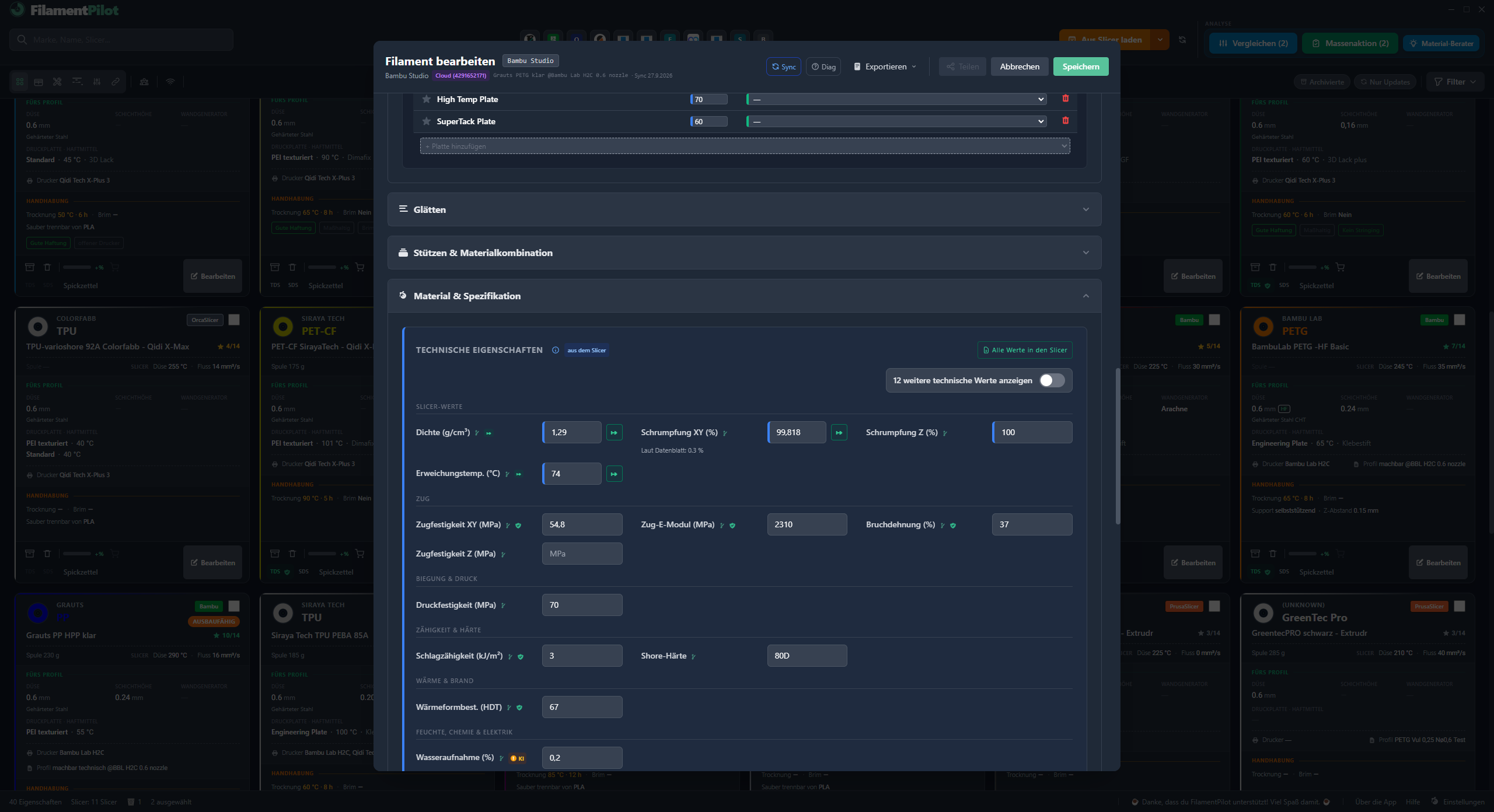
For filament manufacturers
Do you make filament?
Set up your material once and hand it out as a FilamentPilot file. One file instead of a separate guide for every slicer.
- ✓ Your customer prints with your tested values — from the very first try
- ✓ Fewer support requests that are really settings questions
- ✓ Your name and logo appear on the printout at your customer's
Features
Everything you need —
nothing you don't.
Whatever ends up on the card, stays on the card. For every filament, for every printer.
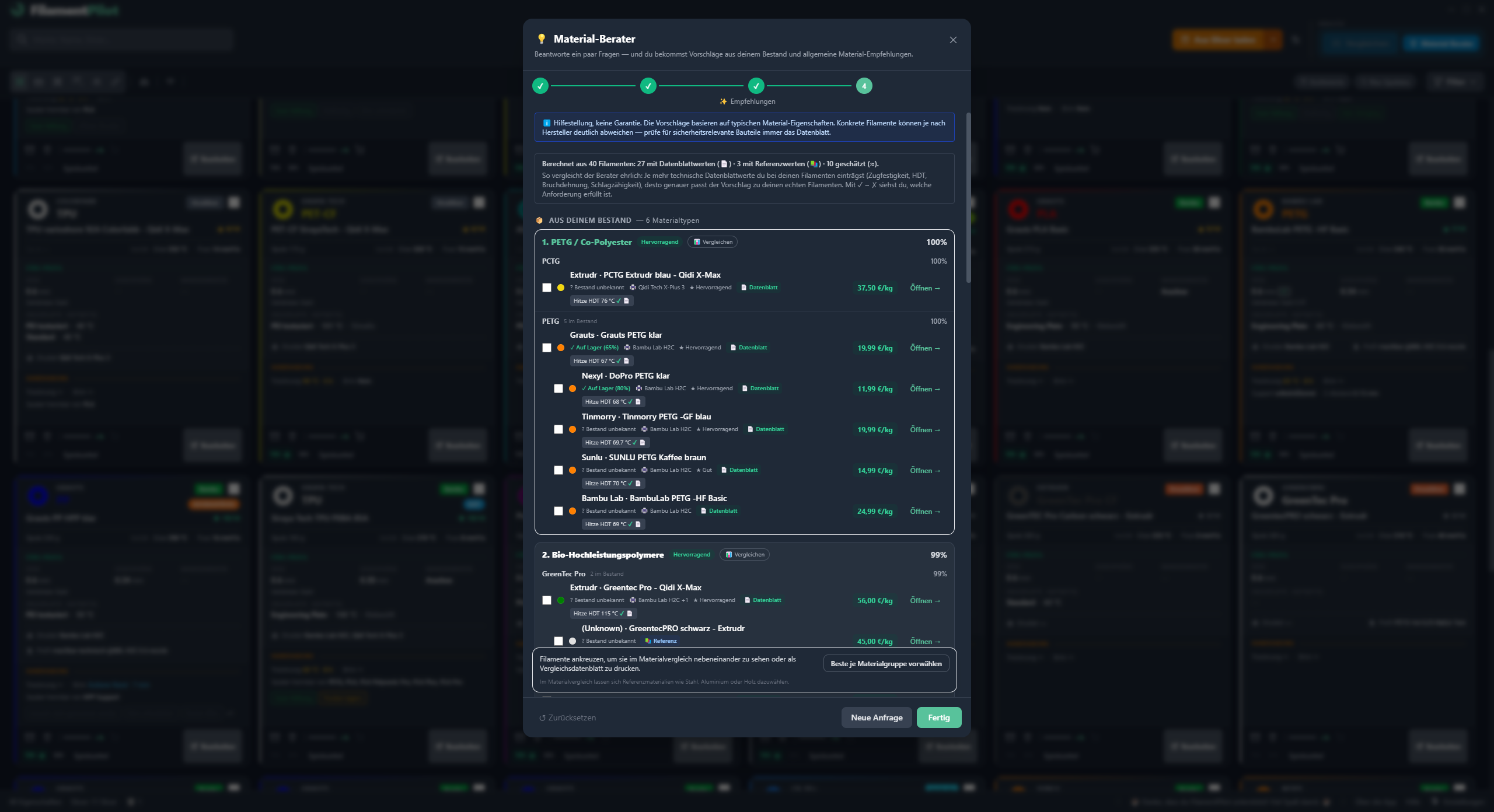
Material advisor
You describe your project, FilamentPilot suggests a material from your own stock. No more guessing, no search engine needed.
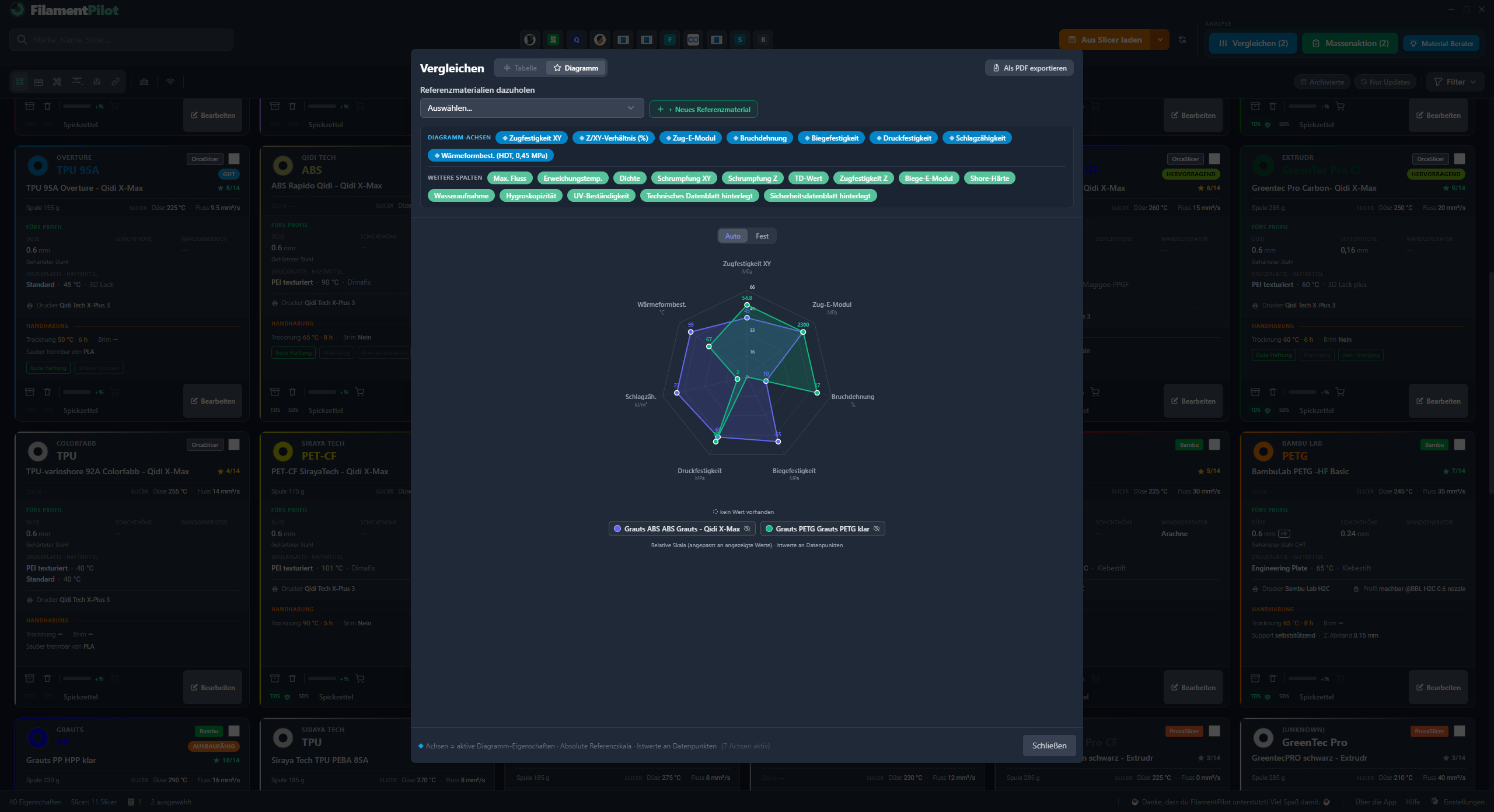
Material comparison
PETG or ABS? Put them side by side and see, in numbers, how far apart they are. Works the same for two PETGs from different manufacturers. As a chart, or as a print-ready comparison datasheet.
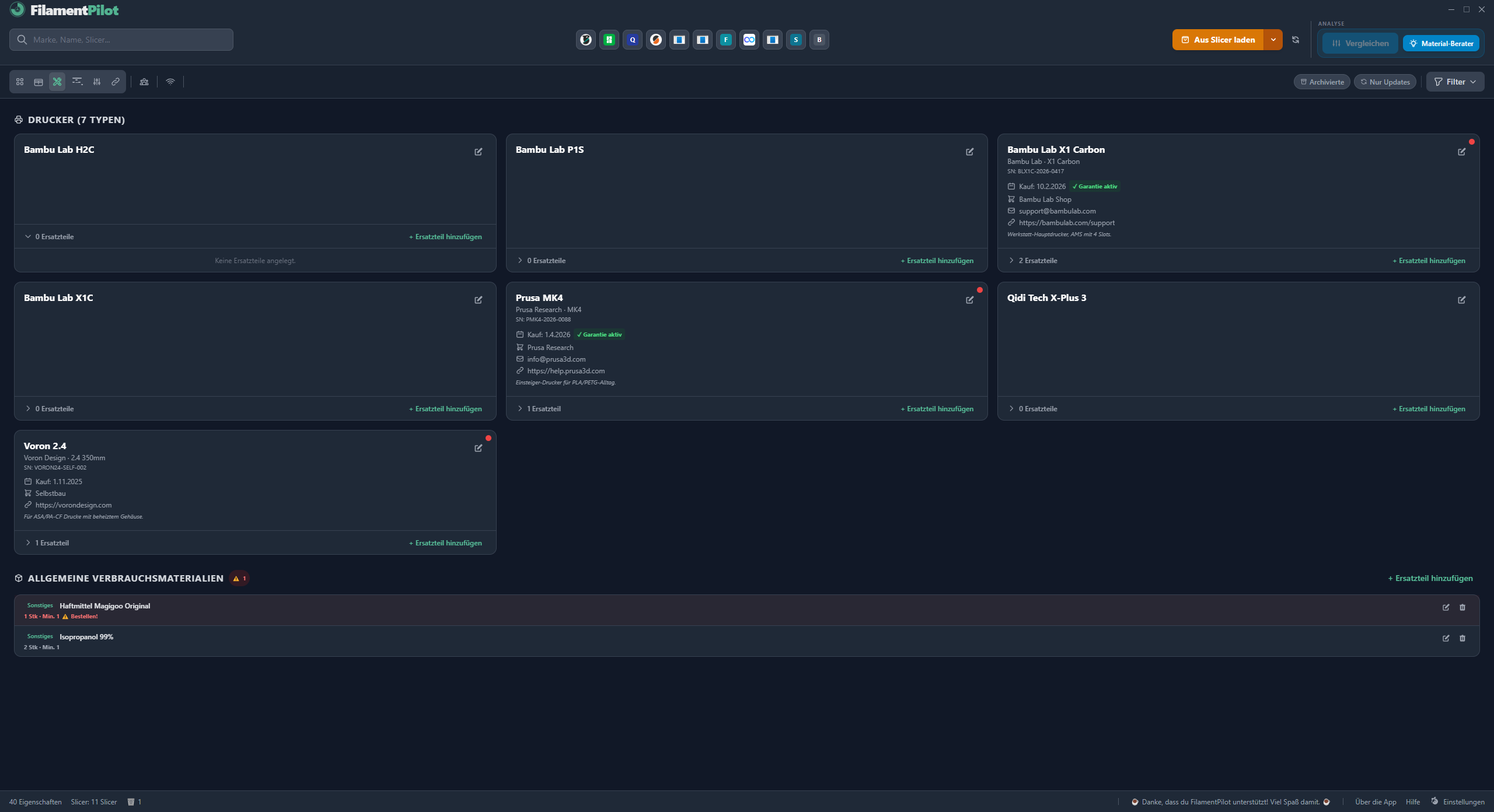
Printers & spare parts
Every printer with model, warranty, dealer and support contact. Spare parts with minimum stock, shop link and replacement date. The app warns you before a spare part runs out.
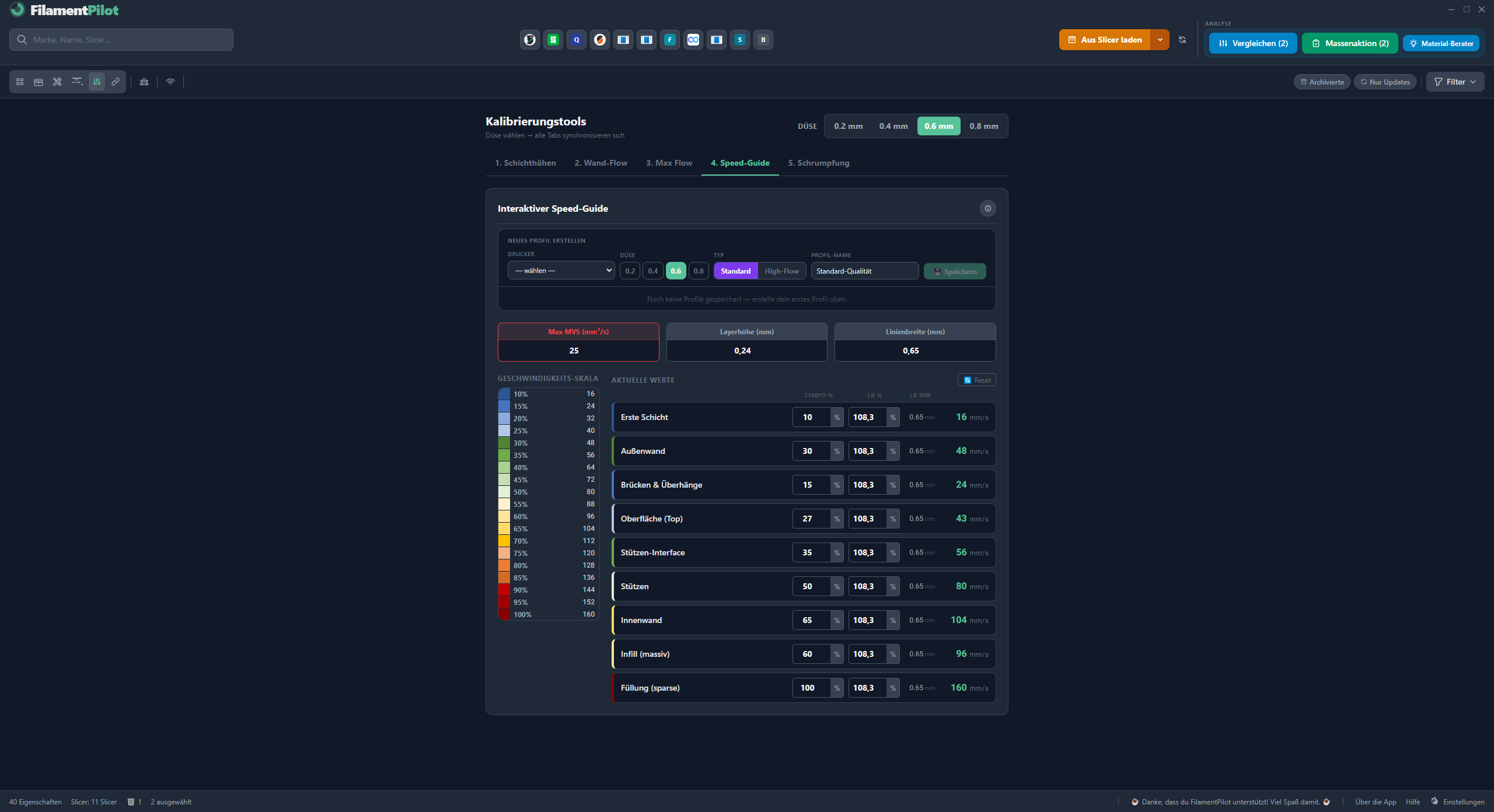
Five calibration tools
Five tools that build on each other: layer height, wall flow, throughput, speed guide and shrinkage. Print, measure, enter the value — FilamentPilot does the maths.
No extra software, no internet.
And there's more built in.
Twelve more features we won't spell out here one by one. Each leads to its own chapter.
Each one leads to its chapter — or read it all in one go.
Your workflow
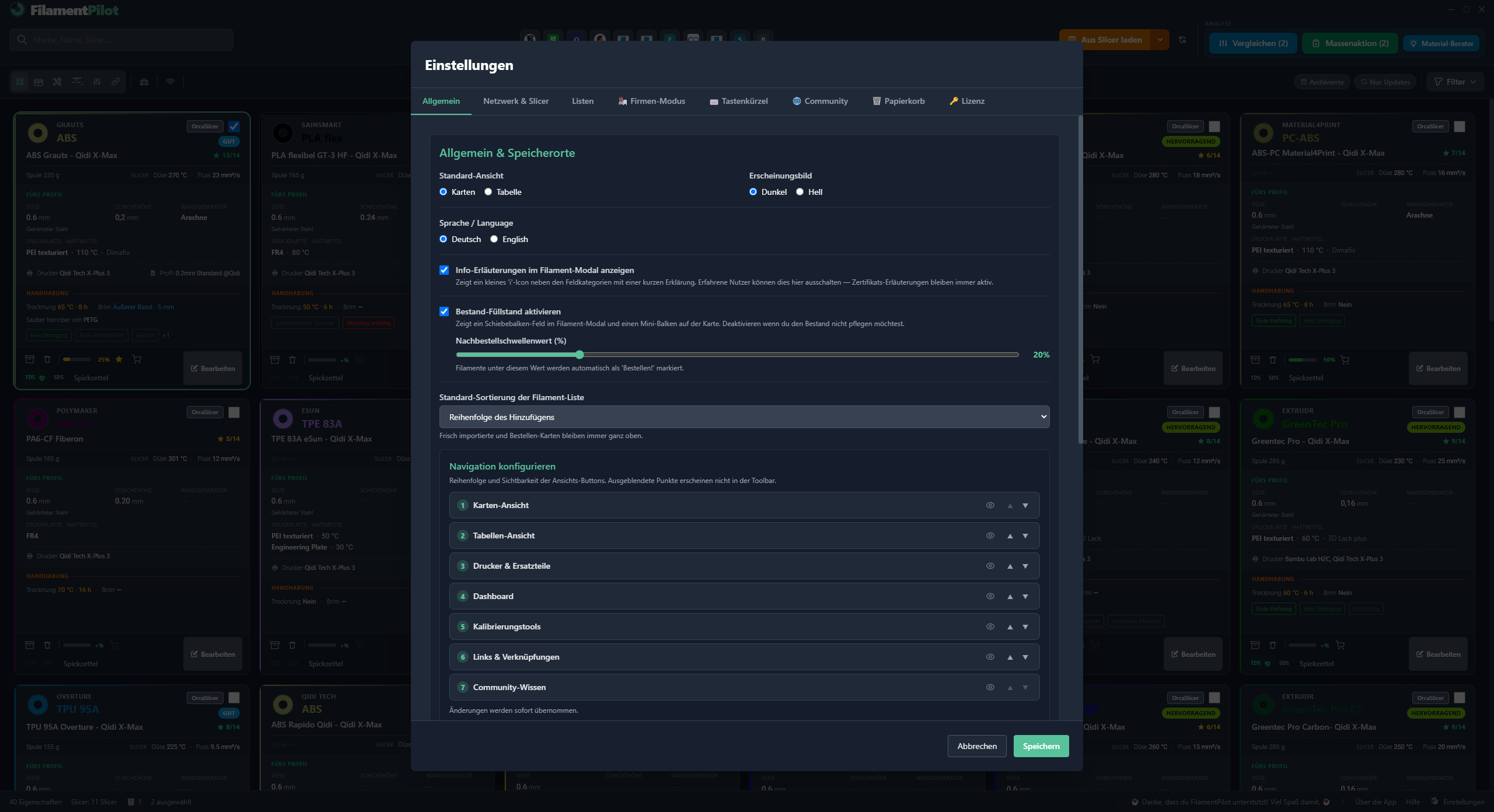
Your view. One source of truth on every computer. No cloud. Spool tracking and material usage at a glance.
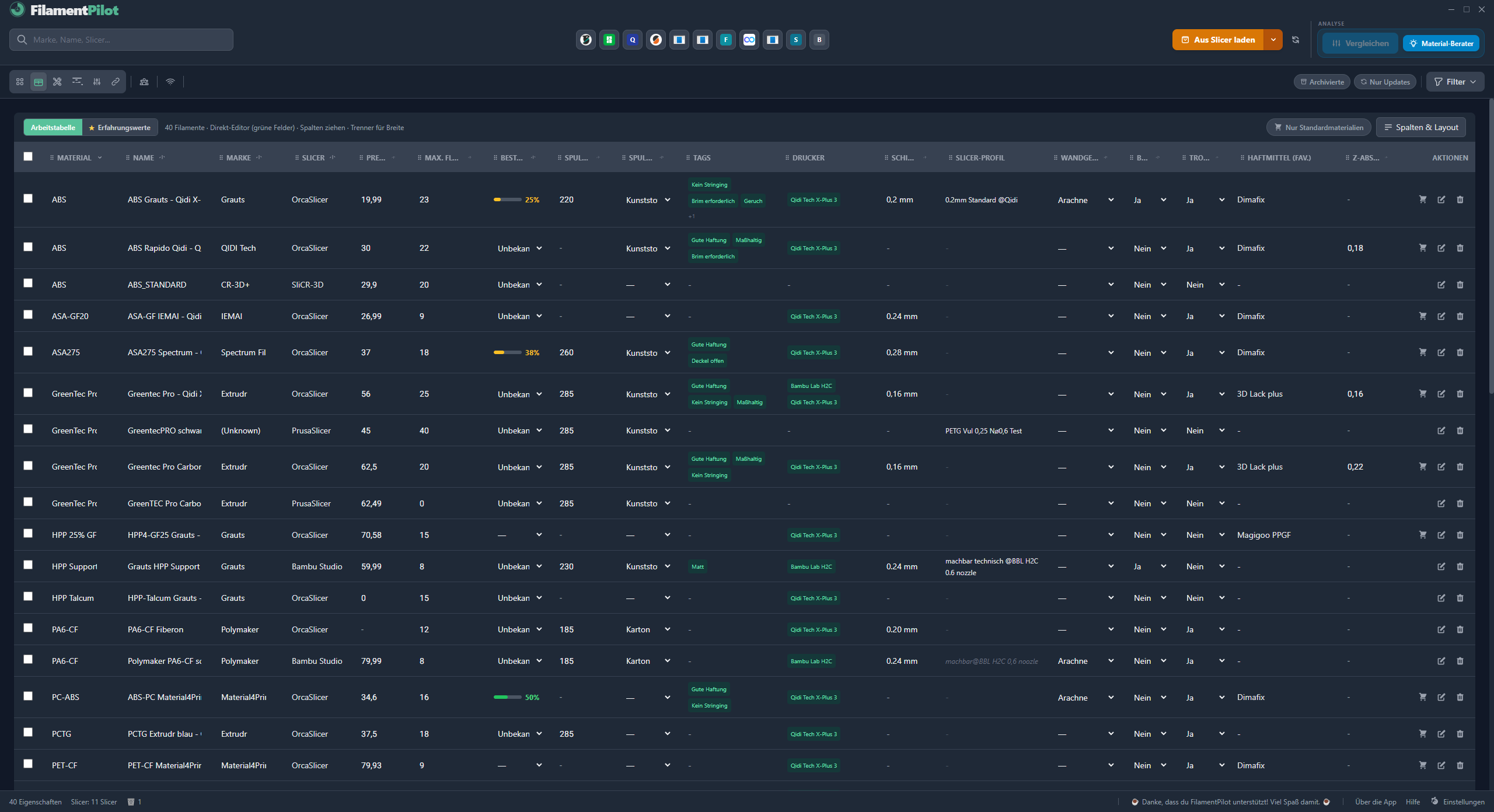
You set up the view the way you work. Every computer shows the same state. What you enter on one is instantly there on the other.
Cards or table — you decide
One folder for every computer
You put your data in a folder every computer can reach — on a network drive, your router, or a USB stick plugged into it. Every computer reads and writes there. What you enter on the workshop PC is already there on the office PC. No account, no cloud, no server — your data stays in your building.
Pick a shared folder — NAS, router, USB stick
Point every computer at the same folder
Done — the same database, plus access from your phone at the printer
🏆 Partners & Community
FilamentPilot — but not alone.
Manufacturers and creators accompany the app, give feedback and share their experience.
Partner
Grauts
Filament manufacturer · Made in Germany
A German manufacturer with a broad line-up: HPP, PA, ABS, PLA and PETG — from standard materials to technical grades. Partner from day one.
Community
moons3dwelt
Content creator covering 3D printing
Features FilamentPilot, reports bugs and brings in new ideas — exactly the kind of support that makes the app better.
Do you make filament, run a shop, or feature FilamentPilot in your videos? One email is enough.
"The slicer knows the technical parameters. FilamentPilot collects what you'd otherwise jot down somewhere else — which brim held, which support came off cleanly, how long the material needed to dry."
Made by a maker. Made for makers.
Pricing
Buy once.
Use forever.
No subscription, no follow-up costs, no account.
Free version
€0
free forever
For starting out — with the materials everyone begins with.
- ✓ Up to 15 filament cards (PLA, PETG, TPU)
- ✓ Import from your slicer and write into every slicer
- ✓ Manufacturer profiles in any material — including ABS, PA, PC
- ✓ Printers, stock and calibration
Personal
€19.99
one-time · 1 PC
As soon as your first ASA, PA or carbon-filled material joins the mix.
- ✓ Unlimited cards, every material
- ✓ A4 cheat sheet for every filament
- ✓ Material advisor and comparison with radar chart
Workshop
€69.99
one-time · up to 5 PCs
When several computers and several people need the same shared state.
- ✓ Everything in Personal, without limits
- ✓ One folder for every computer — no cloud, no account
- ✓ Phone at the printer, and your own logo on the cheat sheet
- ✓ Share filament profile and matching print profile as one package
FAQ
Frequently asked questions
Does FilamentPilot need a connection to my 3D printer?
No. FilamentPilot is pure management software — it doesn't connect to your printer and doesn't install anything at the system level. It only reads and writes the profile files on your hard drive that your slicer already creates.
Do I need an account or internet?
No. FilamentPilot runs entirely locally on your computer — no account, no cloud, no permanent internet connection.
Windows warns during installation. Is it safe?
Yes. FilamentPilot is digitally signed, publisher machbar 3D. Windows still warns about every program it has not seen often yet. Click “More info”, check the publisher machbar 3D, then click “Run anyway”. Updates from inside the app run without this warning. With step-by-step pictures →
Do I have to type in my filaments again?
No. FilamentPilot reads the filament profiles from your installed slicers and turns them into cards. After that, you add your own experience.
I only have a few spools — is this worth it already?
It's worth it from the first spool that isn't PLA. Once PETG, TPU or ASA join in, the searching begins: brim, drying, supports, post-processing. That's exactly when you want to look up what worked last time. The Free version costs nothing: PLA, PETG and TPU, up to 15 cards.
Should I create a separate print profile for every filament?
Better not to. A print profile describes your machine — layer height, speeds, wall generator. You need one of those per printer, tuned to the hardware. What differs from material to material belongs in the filament profile: temperatures, throughput, cooling, retraction. If you create a print profile per filament, you multiply the work at every slicer update — and again for 0.6 mm and high-flow nozzles. The full recommendation with an example →
Does FilamentPilot change anything in my slicer profiles?
Only if you trigger it. An export writes a new profile file, and individual values only go back into a profile at the press of a button. Nothing happens on its own.
What does FilamentPilot cost?
The Free version costs nothing: PLA, PETG and TPU, up to 15 filaments. Personal is €19.99 for one PC, Workshop is €69.99 for up to five PCs. One-time payment, no subscriptions.
On how many computers can I use the licence?
Personal on one PC, Workshop on up to five PCs in the same business. The shared network folder keeps the database identical everywhere.
What's a master profile?
You can link several print profiles to one filament — for example fine, standard and fast, all for the same printer. You mark one of them as the master. FilamentPilot then compares the values on the card with that profile and shows you where they diverge. That's how you notice when something changed in the slicer while the card still shows the old state. Explained in detail →
I make filament — what's in it for me?
You set up your material once and hand it to your customers as a FilamentPilot file. They write it into their slicer and print with your values. More for manufacturers →
Start for free now.
Download the Windows app and save your 3D-printing know-how — free, no account, no cloud.
Try it free